




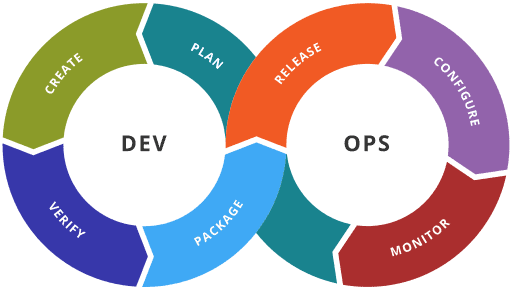
In software development, DevOps promises faster delivery, increased collaboration, and more reliable deployments. However, many teams unknowingly fall into anti-patterns.
Anti-patterns refer to recurring practices that may seem beneficial initially but ultimately hinder the principles of effective DevOps: collaboration, automation, fast feedback, and shared responsibility. These patterns become entrenched over time, creating technical debt, inefficiencies, and systemic resistance to change.
This comprehensive guide outlines some of the most common DevOps anti-patterns, explains the risks they pose, and provides detailed strategies for how teams can avoid them. Whether you’re implementing CI/CD, building internal platforms, or modernizing database workflows, understanding and avoiding these pitfalls is key to a successful DevOps transformation.
Why you shouldn’t create a dedicated ‘DevOps team’
Creating a dedicated DevOps team tasked with handling deployments, CI/CD, and automation is a widespread anti-pattern. While the intent may be to introduce DevOps expertise, it often creates a new silo rather than dismantling the old ones.
Why does it happen?
Organizations accustomed to rigid roles attempt to add DevOps as a separate responsibility instead of a shared cultural transformation. It becomes a catch-all team for infrastructure and tooling, isolating them from developers and operations. The title “DevOps engineer” is sometimes misinterpreted to mean someone who owns DevOps, instead of enabling it across the organization.
The consequences of having a dedicated DevOps team
- Lack of ownership by developers: developers may feel less accountable for deployment and operational issues, assuming it’s the ‘job’ of the DevOps team.
- Communication breakdowns: a separate team often leads to slower handoffs and misunderstandings during incidents or changes.
- Increased bottlenecks: the DevOps team becomes a gatekeeper rather than an enabler, delaying delivery timelines.
- Inefficient knowledge transfer: knowledge silos prevent developers from learning critical operational insights.
What to do instead
- Promote embedded DevOps culture: encourage developers and operations to work side-by-side with shared objectives.
- Foster cross-functional teams: form squads that own the full lifecycle of their applications, from development to monitoring.
- Provide training and enablement: equip all team members with the skills and tools they need for automation, infrastructure, and operations.
- Adopt shared metrics: use team-based KPIs (e.g., lead time, deployment frequency, MTTR) to align incentives and measure outcomes.
Why you shouldn’t focus solely on tools
Many teams adopt DevOps by investing in tools: Jenkins, Docker, Terraform, Kubernetes, etc. However, assuming that adopting these tools equates to DevOps is a mistake. Tools are only enablers and means to an end – they do not replace culture, collaboration, and discipline.
Tool adoption is tangible and easy to measure. Cultural change, on the other hand, is abstract, takes time, and can produce effects that are difficult to capture and quantify. Teams often conflate automation with transformation, believing DevOps is achieved through obtaining, and implementing, a shopping list of tools rather than rethinking workflows and other human interactions.
The consequences of focusing solely on tools during DevOps adoption
- Tool overload: teams accumulate a mix of overlapping tools, increasing complexity and reducing efficiency.
- Lack of standardization: without governance, different teams use different tools for the same tasks, making collaboration difficult, and sometimes producing unexpected outcomes.
- Underutilized tools: tools are purchased or adopted but poorly implemented, wasting time and budget.
- Neglected process improvement: the organization misses the real benefits of DevOps by ignoring culture, process, effectiveness measurement, and feedback loops.
What to do instead
- Prioritize culture over tools: focus on team collaboration, trust, and process improvement before tool acquisition.
- Perform toolchain audits: regularly review tools in use to ensure they’re meeting organizational needs, subject to ongoing performance measurements, and not duplicating functions.
- Choose tools that integrate well: select tools that fit your existing workflow and can be harmoniously extended as your team grows.
- Document and train: ensure clear documentation and training are available for tool usage to avoid reliance on tribal knowledge, and / or obsolete utilization practices.
Why you shouldn’t introduce too many manual steps in CI/CD pipelines
Including too many manual steps or approvals in CI/CD pipelines slows down delivery and introduces room for error. This includes manual testing, deployment validation, or environment configuration.
Teams add manual checkpoints because of a lack of trust in automation or incomplete test coverage. They believe that, with compliance or audit requirements needing to be met, defaulting to human approvals reduces risk.
The consequences of manual processes
- Inconsistent deployments: manual processes are prone to human error, resulting in configuration drift and failed releases.
- Slower delivery: each manual approval or action adds latency to the deployment pipeline, reducing throughput.
- Low confidence in automation: teams may rely even more on manual steps because their pipelines lack visibility and testing.
- Reduced auditability: manual steps are harder to track, making audits and compliance more difficult. Errors and failures may go partially or completely uncaptured / unreported.
How to break away from reliance on manual processes
- Automate everything: use automation tools (e.g., GitHub Actions, GitLab CI, CircleCI, Redgate’s automation tools) to handle all repeatable processes.
- Use Infrastructure-as-Code (IaC): automate infrastructure changes using tools like Terraform or Pulumi to ensure repeatability.
- Test early and often: implement test automation throughout the development lifecycle with test pyramids, and test accuracy and completeness of coverage metrics.
- Codify approval policies: use policy-as-code tools (like OPA and Gatekeeper) to enforce approval gates without human intervention.
- Adopt progressive delivery: use strategies like canary, blue-green, or A/B testing to reduce risk and enable faster feedback.
Accelerate and simplify database development with Redgate
Why continuous integration should be followed by continuous delivery
Some teams implement CI to build and test code changes automatically but stop short of automating deployment to staging or production environments. They claim to be “doing DevOps” but still rely on manual deployment checklists.
This happens due to fear of breaking production, lack of deployment confidence, or organizational resistance to frequent releases – and can hold teams back from implementing CD.
The consequences of not implementing continuous delivery
- Delayed time to value: code sits in the repository for weeks or months without delivering any business benefit.
- Large, risky releases: changes accumulate and become harder to test, increasing the likelihood and complication of failure during deployment.
- Feedback delays: QA and stakeholders can only validate changes late in the process, leading to rework and missed deadlines.
- Broken developer confidence: developers hesitate to merge code, fearing it may break production later.
How to implement CI/CD properly
- Build end-to-end CI/CD pipelines: automate the flow from commit to deployment across all environments.
- Start with staging CD: gain confidence by automatically deploying to a staging environment before moving to production.
- Integrate rollback mechanisms: use health checks and observability to detect failures and trigger automatic rollback.
- Leverage feature flags: deploy code behind toggles to reduce risk and enable safe experimentation, as well as to support A/B tests to see what version of a feature users actually prefer. Keep in mind to avoid too many flags, and ensure cleanup of all toggles.
- Use value-stream mapping (VSM): identify and remove delays in the delivery pipeline to improve overall flow efficiency.
Why you should avoid operating a blame-oriented culture
A culture that penalizes failure or focuses on individual mistakes inhibits teams from sharing insights and improving systems. In many organizations, post-incident reviews devolve into finger-pointing rather than learning.
This is a result of legacy management structures where individual performance is often rewarded when something goes right, but blame is assigned during outages or post-mortems. Teams are afraid to admit mistakes, discouraging transparency.
The consequences of a blame-oriented culture
- Low morale: team members become afraid to innovate or take risks, fearing punishment or ridicule.
- Reduced transparency: individuals may hide incidents or errors, leading to undiagnosed systemic problems.
- Inefficient incident response: focus shifts from resolving issues to defending oneself, delaying resolution.
- Stifled innovation: fear of failure discourages experimentation and learning.
How to prevent a blame-oriented culture
- Implement blameless postmortems: focus on system-level improvements, not individual blame. Encourage open sharing of incident details.
- Cultivate psychological safety: build a team environment where people feel safe to speak up, admit mistakes, and share ideas.
- Adopt just culture principles: differentiate between acceptable errors and negligent behaviors, fostering a learning mindset.
- Reward transparency: publicly acknowledge individuals or teams that raise issues early or share valuable insights.
- Include leadership in learning: ensure leadership participates in postmortems to model accountability and learning.
Why you should avoid misusing microservices
Splitting applications into microservices too early or without clear domain boundaries can result in complexity and fragile integrations. Teams sometimes split services for the sake of architecture trends.
Microservices are seen as a silver bullet for scalability and team autonomy. However, many teams lack experience in distributed systems or ignore domain-driven design (DDD) principles.
The consequences of misusing microservices
- Operational complexity: each service introduces new infrastructure, logging, monitoring, and deployment requirements.
- Tight coupling between services: poorly designed service boundaries result in cascading failures and difficult maintenance.
- Debugging nightmare: without proper tracing, understanding service interactions becomes a major challenge.
- Slower development: teams spend more time on boilerplate, integrations, and debugging than on delivering business features.
How to avoid misusing microservices
- Adopt domain-driven design (DDD): use DDD to define clear service boundaries and avoid premature decomposition.
- Start with a modular monolith: validate architectural decisions within a monolith before splitting into microservices.
- Introduce service mesh: use tools like Istio or Linkerd to manage service communication, retries, and security.
- Invest in observability early: implement centralized logging, distributed tracing, and metrics collection from the start.
- Automate dependency management: use CI pipelines to test contract compatibility between services.
Why you should ensure effective monitoring and observability
Lack of real-time monitoring, logs, and metrics prevents teams from detecting issues, understanding performance, and resolving incidents quickly. Monitoring is treated as an afterthought, often bolted on late in the development process. Teams may rely on reactive support tickets rather than proactive instrumentation.
What are the consequences of ineffective monitoring and observability?
- Delayed detection of issues: without proper alerts, critical incidents go unnoticed until users complain.
- Low confidence in releases: teams hesitate to deploy because they lack visibility into how changes affect performance/generate risk.
- Reactive debugging: engineers must manually sift through logs after an incident rather than having proactive alerts.
- Poor user experience: performance issues and downtime persist longer, degrading customer satisfaction.
How to implement an effective monitoring and observability process
- Define SLIs/SLOs: establish clear service-level indicators and objectives to measure reliability.
- Use the three pillars of observability: implement logging, metrics, and tracing using tools like Redgate Monitor, Prometheus, Grafana, and Jaeger.
- Automate dashboards and alerts: create dynamic dashboards and actionable alerts integrated with your incident response workflow.
- Enable self-service analytics: give developers access to observability tools so they can troubleshoot issues independently.
- Run chaos engineering drills: test observability by injecting faults and measuring response effectiveness.
You may also be interested in:
Why Database Administrators Need Monitoring Tools
Future-proof database monitoring with Redgate Monitor
Why you shouldn’t neglect security integration (DevSecOps)
Security is handled as a final gate before production or as a completely separate concern from development and operations. This breaks the DevOps feedback loop.
Security teams are often siloed and lack automation expertise. Developers may not be trained in secure coding practices or compliance standards.
The consequences of neglecting security
- Late discovery of vulnerabilities: security issues are found during final testing or even post-deployment.
- Increased attack surface: without automated checks, misconfigurations and unpatched dependencies creep into production.
- Security bottlenecks: manual reviews slow down development and cause friction between teams.
- Compliance failures: inadequate logging and traceability lead to audit and compliance issues.
How to integrate security (DevSecOps) into your workflows
- Integrate security into CI/CD: use tools like Snyk, SonarQube and Trivy to scan code, containers, and dependencies.
- Shift security left: educate developers on secure coding practices and give them early feedback during coding.
- Apply IaC security: scan infrastructure-as-code for misconfigurations before provisioning (e.g., using tfsec or Checkov).
- Use secrets management: store secrets in secure tools like HashiCorp Vault or AWS Secrets Manager – not in source code.
- Maintain security baselines: define and enforce secure defaults for environments and workloads.
Why you shouldn’t over-engineer Internal Developer Platforms (IDPs)
Building complex internal platforms with excessive abstraction and configuration can create more barriers than benefits. These platforms become hard to maintain and often miss developers’ needs.
Platform engineering is a hot trend. Teams rush to build IDPs without understanding real developer pain points or focusing on user experience. Imagined needs sometimes become unduly influential.
The consequences of over-engineering Internal Developer Platforms (IDPs)
- Low adoption rates: developers bypass the platform due to complexity or poor UX.
- Wasted resources: time and effort is spent on building features nobody uses.
- Slower development: instead of empowering developers, the platform becomes a barrier to shipping software.
- High maintenance burden: every additional feature adds technical debt and increases support overhead.
How to avoid over-engineering Internal Developer Platforms (IDPs)
- Design with developer experience first: prioritize ease of use and speed. Talk to users regularly to understand their pain points.
- Iterate incrementally: start with essential features (CI/CD, scaffolding, secrets) and evolve based on feedback.
- Measure platform usage: use analytics to monitor adoption, satisfaction, and impact on productivity.
- Create self-service interfaces: provide command-line interfaces (CLIs), application programming interfaces (APIs), and user interfaces (UIs) that allow developers to onboard and deploy with minimal friction.
- Treat the platform as a product: assign product managers, gather feedback, run retrospectives, and publish roadmaps.
Why you should avoid using static and long-lived test environments
Teams rely on shared staging environments that are long-lived, manually configured, or prone to drift from production. These environments are hard to manage and unreliable for validation.
This often happens because creating dynamic environments may seem too complex or resource-intensive. Teams often lack Infrastructure-as-Code (IaC) or orchestration capabilities.
What are the consequences of using static and long-lived test environments?
- Environment drift: shared staging environments drift from production, making test results unreliable.
- Contention and scheduling conflicts: teams must coordinate deployments, leading to delays and blocking work.
- Hard-to-reproduce bugs: issues found in testing may not be reproducible elsewhere due to differences in configuration or data.
- High maintenance costs: maintaining long-lived environments increases infrastructure and support costs.
How to prevent reliance on static and long-lived test environments
- Use ephemeral environments: automatically spin up environments per branch or pull request using IaC and container orchestration.
- Automate environment provisioning: ensure consistency using tools like Helm, Kustomize, or Argo CD.
- Simulate production conditions: mirror production topology and data as closely as possible using anonymized datasets.
- Schedule automatic cleanup: tear down environments after a set time to save costs and avoid drift.
- Integrate with CI workflows: trigger environment creation and teardown automatically from CI pipelines.
Compliance without Compromise
Final thoughts and next steps
DevOps anti-patterns aren’t just bad habits – they’re systemic issues that, if left unchecked, can stall or completely derail your DevOps transformation. Recognizing and addressing them requires a willingness to question the status quo and invest in cultural, technical, and procedural change.
When teams eliminate silos, align on shared goals, automate intelligently, and embed security and observability into pipelines, they create a resilient and high-performing software delivery system. DevOps isn’t a toolset or a job title; it’s a mindset, and avoiding these anti-patterns is essential to adopting it.
Invest in cross-functional collaboration, continuous feedback, and simplicity. True DevOps success comes from building systems that evolve with your teams and empower them to deliver value quickly and safely.
This document contains proprietary information and is protected by copyright law.
Copyright © 2026 Red Gate Software Limited. All rights reserved




Load comments